UML 2 Sequence Diagramming Guidelines

Scott W. Ambler + Associates
 
   Home  |  AMDD  |  Best Practices  |  Architecture  |  Requirements  |  Analysis  |  Design  |  Documentation  |  Models  |  Modeling Style  |  Contact Us  |  Announcements  |  FAQ
Elements of UML 2.0 Style

UML Sequence diagrams are a dynamic modeling technique, as are collaboration diagrams and activity diagrams.  UML sequence diagrams are typically used to:

  1. Validate and flesh out the logic of a usage scenario.  A usage scenario is exactly what its name indicates – the description of a potential way that your system is used.  The logic of a usage scenario may be part of a use case, perhaps an alternate course; one entire pass through a use case, such as the logic described by the basic course of action or a portion of the basic course of action plus one or more alternate scenarios; or a pass through the logic contained in several use cases, for example a student enrolls in the university then immediately enrolls in three seminars. 
  2. Explore your design because they provide a way for you to visually step through invocation of the operations defined by your classes.
  3. To detect bottlenecks within an object-oriented design.  By looking at what messages are being sent to an object, and by looking at roughly how long it takes to run the invoked method, you quickly get an understanding of where you need to change your design to distribute the load within your system.  In fact some CASE tools even enable you to simulate this aspect of your software. 
  4. Give you a feel for which classes in your application are going to be complex, which in turn is an indication that you may need to draw state chart diagrams for those classes.


There are guidelines for:

  1. General Issues
  2. Classifiers
  3. Messages
  4. Return Values


1.        General Guidelines

Figure 1. Enrolling a student.  

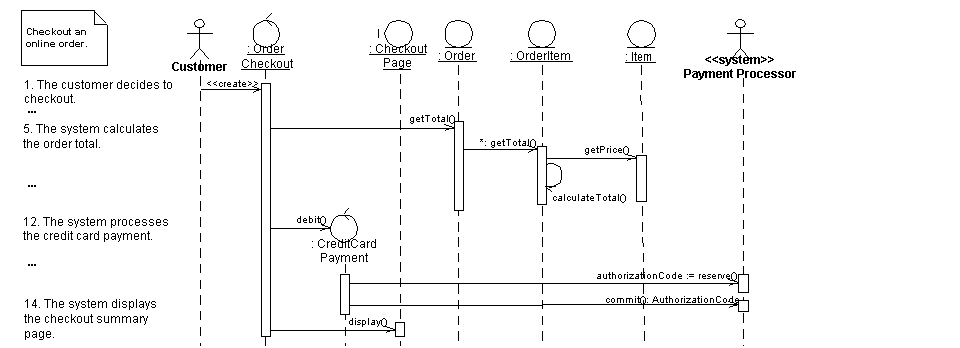
Figure 2. Checking out an online order.
 

  1. Strive for Left-To-Right Ordering Of Messages
  2. Layer The Classifiers
  3. Name Actors Consistently With Your Use Case Diagrams
  4. Name Classes Consistently With Your Class Diagrams
  5. An Actor Can Have The Same Name as a Class
  6. Include a Prose Description of the Logic
  7. Place Human and Organization Actors On the Left-Most Side of Your Diagram
  8. Place Reactive System Actors on the Right-Most Side of Your Diagram
  9. Place Proactive System Actors on the Left-Most Side of Your Diagram
  10. Avoid Modeling Object Destruction


2.        Guidelines for Classifiers

Important: Naming conventions for classifiers are described elsewhere.  In particular, naming conventions for classes and interfaces are described in Style Guidelines for UML Class Diagrams, for use cases in Style Guidelines for UML Use Case Diagrams, and for components in Style Guidelines for UML Component Diagrams.


Figure 3. Transferring funds between accounts.


  1. Name Objects When You Refer To Them In Messages
  2. Name Objects When Several of the Same Type Exist
  3. Apply Textual Stereotypes Consistently 
  4.  Apply Visual Stereotypes Sparingly 
  5. Focus on Critical Interactions


3.        Message Guidelines

Important: Naming conventions for operation signatures, guidelines that are pertinent to naming messages, parameters, and return values, are described in detail in Style Guidelines for UML Class Diagrams. 

  1. Justify Message Names Beside the Arrowhead
  2. Create Objects Directly

  3. Apply Operation Signatures for Software Messages
  4. Use Prose for Messages Involving Human and Organization Actors
  5. Prefer Names Over Types for Parameters
  6. Indicate Types as Parameter Placeholders
  7. Messages to Classes are Implemented as Static Operations
  8. Apply the <<include>> Stereotype for Use Case Invocations


4.        Guidelines for Return Values

  1. Do Not Model a Return Value When it is Obvious What is Being Returned
  2. Model a Return Value Only When You Need to Refer to It Elsewhere
  3. Justify Return Values Beside the Arrowhead
  4. Model Return Values As Part of a Method Invocation
  5. Indicate Types as Return Value Placeholders
  6. Explicitly Indicate The Actual Value for Simple Values


5. Recommended Resources

Elements of UML 2.0 Style   The Elements of UML 2.0 Style describes a collection of standards, conventions, and guidelines for creating effective UML diagrams. They are based on sound, proven software engineering principles that lead to diagrams that are easier to understand and work with.  These conventions exist as a collection of simple, concise guidelines that if applied consistently, represent an important first step in increasing your productivity as a modeler.  This book is oriented towards intermediate to advanced UML modelers, although there are numerous examples throughout the book it would not be a good way to learn the UML (instead, consider The Object Primer).  The book is a brief 188 pages long and is conveniently pocket-sized so it's easy to carry around.
The Object Primer 3rd Edition: Agile Model Driven Development (AMDD) with UML 2   The Object Primer 3rd Edition: Agile Model Driven Development with UML 2 is an important reference book for agile modelers, describing how to develop 35 types of agile models including all 13 UML 2 diagrams.  Furthermore, this book describes the techniques of the Full Lifecycle Object Oriented Testing (FLOOT) methodology to give you the fundamental testing skills which you require to succeed at agile software development.  The book also shows how to move from your agile models to source code (Java examples are provided) as well as how to succeed at implementation techniques such as refactoring and test-driven development (TDD).  The Object Primer also includes a chapter overviewing the critical database development techniques (database refactoring, object/relational mapping, legacy analysis, and database access coding) from my award-winning Agile Database Techniques book.
Agile Modeling   Agile Modeling: Effective Practices for Extreme Programming and the Unified Process is the seminal book describing how agile software developers approach modeling and documentation.  It describes principles and practices which you can tailor into your existing software process, such as XP, the Rational Unified Process (RUP), or the Agile Unified Process (AUP), to streamline your modeling and documentation efforts.  Modeling and documentation are important aspects of any software project, including agile projects, and this book describes in detail how to elicit requirements, architect, and then design your system in an agile manner.


Let Us Help

We actively work with clients around the world to improve their information technology (IT) practices, typically in the role of mentor/coach, team lead, or trainer.  A full description of what we do, and how to contact us, can be found at Scott W. Ambler + Associates.


Agile Data (AD)  |  Agile Unified Process (AUP)  |  Enterprise Unified Process (EUP)  |  Disciplined Agile Delivery (DAD)  |  My Writings   |  IT Surveys  

Follow Scott W. Ambler on Twitter


Copyright © 2002-2012 Scott W. Ambler

This site owned by Ambysoft Inc.