
Agile Requirements Modeling: Strategies for Agile Teams
Table of Contents
- Agile requirements modeling in a nutshell
- Where do requirements come from?
- Core practices
- Types of requirements
- Potential requirements artifacts
- Techniques for eliciting requirements
- Common requirements modeling challenges
- Agile requirements change management
1. Agile Requirements Modeling in a Nutshell
Figure 1 depicts the Agile Model Driven Development (AMDD) lifecycle, which depicts how Agile Modeling (AM) is applied by agile software development teams. The critical aspects which we’re concerned about right now are initial requirements modeling, sprint modeling, model storming, and acceptance test-driven development (ATDD). The fundamental idea is that you do just barely enough modeling at the beginning of the project to understand the requirements for your system at a high level, then you gather the details as you need to on a just-in-time (JIT) basis.
Figure 1. The AMDD lifecycle (click to enlarge).

1.1 Initial Requirements Modeling
At the beginning of an initiative you need to take several days to envision the high-level requirements and to understand the scope of the release (what you think the system should do). Your goal is to get a gut feel for what the effort is all about, not to document in detail what you think the system should do: the documentation can come later, if you actually need it. For your initial requirements model my experience is that you need some form of:
- Usage model. As the name implies usage models enable you to explore how users will work with your system. This may be a collection of essential use cases on a Unified Process (UP) team, a collection of features for a Feature Driven Development (FDD) tea , or a collection of user stories for an Extreme Programming (XP) team, or any of the above on a Disciplined Agile team.
- Initial domain model. A domain model identifies fundamental business entity types and the relationships between then. Domain models may be depicted as a collection of Class Responsibility Collaborator (CRC) cards, a slim UML class diagram, or even a slim data model. This domain model will contain just enough information: the main domain entities, their major attributes, and the relationships between these entities. Your model doesn’t need to be complete, it just needs to cover enough information to make you comfortable with the primary domain concepts.
- User interface model. For user interface intensive solutions you should consider developing some screen sketches or even a user interface prototype.
What level of detail do you actually need? My experience is that you need requirements artifacts which are just barely good enough to give you this understanding and no more. For example, Figure 2 depicts a simple point-form use case. This use case could very well have been written on an index card, a piece of flip chart paper, or on a whiteboard. It contains just enough information for you to understand what the use case does, and in fact it may contain far too much information for this point in the lifecycle because just the name of the use case might be enough for your stakeholders to understand the fundamentals of what you mean. Figure 3, on the other hand, depicts a fully documented formal use case. This is a wonderful example of a well documented use case, but it goes into far more detail than you possibly need right now. If you actually need this level of detail, and in practice you rarely do, you can capture it when you actually need to by model storming it at the time. The longer your team goes without the concrete feedback of working software, the greater the danger that you’re modeling things that don’t reflect what your stakeholders truly need.
|
Figure 2. A point-form use case.
| Name: Enroll in Seminar
Basic Course of Action:
|
Figure 3. A detailed use case.
| Name: Enroll in Seminar
Identifier: UC 17 Description: Enroll an existing student in a seminar for which she is eligible.
Preconditions: The Student is registered at the University.
Postconditions: The Student will be enrolled in the course she wants if she is eligible and room is available.
Basic Course of Action: 1. The use case begins when a student wants to enroll in a seminar. 2. The student inputs her name and student number into the system via UI23 Security Login Screen. 3. The system verifies the student is eligible to enroll in seminars at the university according to business rule BR129 Determine Eligibility to Enroll. [Alt Course A] 4. The system displays UI32 Seminar Selection Screen, which indicates the list of available seminars. 5. The student indicates the seminar in which she wants to enroll. [Alt Course B: The Student Decides Not to Enroll] 6. The system validates the student is eligible to enroll in the seminar according to the business rule BR130 Determine Student Eligibility to Enroll in a Seminar. [Alt Course C] 7. The system validates the seminar fits into the existing schedule of the student according to the business rule BR143 Validate Student Seminar Schedule. 8. The system calculates the fees for the seminar based on the fee published in the course catalog, applicable student fees, and applicable taxes. Apply business rules BR 180 Calculate Student Fees and BR45 Calculate Taxes for Seminar. 9. The system displays the fees via UI33 Display Seminar Fees Screen. 10. The system asks the student if she still wants to enroll in the seminar. 11. The student indicates she wants to enroll in the seminar. 12. The system enrolls the student in the seminar. 13. The system informs the student the enrollment was successful via UI88 Seminar Enrollment Summary Screen . 14. The system bills the student for the seminar, according to business rule BR100 Bill Student for Seminar . 15. The system asks the student if she wants a printed statement of the enrollment. 16. The student indicates she wants a printed statement. 17. The system prints the enrollment statement UI89 Enrollment Summary Report. 18. The use case ends when the student takes the printed statement.
Alternate Course A: The Student is Not Eligible to Enroll in Seminars. A.3. The registrar determines the student is not eligible to enroll in seminars. A.4. The registrar informs the student he is not eligible to enroll. A.5. The use case ends. Alternate Course B: The Student Decides Not to Enroll in an Available Seminar B.5. The student views the list of seminars and does not see one in which he wants to enroll. B.6. The use case ends. Alternate Course C: The Student Does Not Have the Prerequisites C.6. The registrar determines the student is not eligible to enroll in the seminar he chose. C.7. The registrar informs the student he does not have the prerequisites. C.8. The registrar informs the student of the prerequisites he needs. C.9. The use case continues at Step 4 in the basic course of action.
|
1.2 Sprint Modeling
Sprint modeling is part of your overall sprint planning efforts performed at the beginning of an sprint. You often have to explore requirements to a slightly more detailed level than you did initially, modeling just enough so as to plan the work required to fulfill a given requirement.
1.3 Model Storming
Detailed requirements are elicited, or perhaps a better way to think of it is that the high-level requirements are analyzed, on a just in time basis. When a developer has a new requirement to implement, perhaps the “Enroll in Seminar” use case of Figure 2, they ask themselves if they understand what is being asked for. In this case, it’s not so clear exactly what the stakeholders want, for example we don’t have any indication as to what the screens should look like. They also ask themselves if the requirement is small enough to implement in less than a day or two, and if not then the reorganize it into a collection of smaller parts which they tackle one at a time. Smaller things are easier to implement than larger things.
To discover the details behind the requirement, the developer (or developers on teams which take a pair programming approach), ask their stakeholder(s) to explain what they mean. This is often done by sketching on paper or a whiteboard with the stakeholders. These “ model storming sessions” are typically impromptu events and typically last for five to ten minutes (it’s rare to model storm for more than thirty minutes because the requirements chunks are so small). The people get together, gather around a shared modeling tool (e.g. the whiteboard), explore the issue until their satisfied that they understand it, and then they continue on (often coding). Extreme programmers (XPers) would call requirements modeling storming sessions “customer Q&A sessions”.
In the example of identifying what a screen would look like, together with your stakeholder(s) you sketch what the want the screen to look like, drawing several examples until you come to a common understanding of what needs to be built. Sketches such as this are inclusive models because you’re using simple tools and modeling techniques, this enabling the Agile Modeling (AM) practice of Agile Stakeholder Participation. The best people to model requirements are stakeholders because they’re the ones who are the domain experts, not you.
For a detailed example of how to go about requirements modeling, read the article Agile Requirements Modeling Example.
1.4 Acceptance Test Driven Development (ATDD)
Test-driven development (TDD) (Beck 2003; Astels 2003), is an evolutionary approach to development which that requires significant discipline and skill (and good tooling). The first step is to quickly add a test, basically just enough code to fail. Next you run your tests, often the complete test suite although for sake of speed you may decide to run only a subset, to ensure that the new test does in fact fail. You then update your functional code to make it pass the new tests. The fourth step is to run your tests again. If they fail you need to update your functional code and retest. Once the tests pass the next step is to start over (you may first need to refactor any duplication out of your design as needed). As Figure 4 depicts, there are two levels of TDD:
- Acceptance TDD (ATDD). With ATDD you write a single acceptance test, or behavioral specification depending on your preferred terminology, and then just enough production functionality/code to fulfill that test. The goal of ATDD is to specify detailed, executable requirements for your solution on a just in time (JIT) basis. ATDD is also called Behavior Driven Development (BDD).
- Developer TDD. With developer TDD you write a single developer test, sometimes inaccurately referred to as a unit test, and then just enough production code to fulfill that test. The goal of developer TDD is to specify a detailed, executable design for your solution on a JIT basis. Developer TDD is often simply called TDD.
Figure 4. How ATDD and developer TDD fit together (click to enlarge).

2. Where Do Requirements Come From?
Your stakeholders – direct or indirect users, managers, senior managers, operations staff members, support (help desk) staff members, testers, developers working on other systems that integrate or interact with your, and maintenance professionals – are the only OFFICIAL source of requirements (yes, developers can SUGGEST requirements, but stakeholders need to adopt the suggestions). In fact it is the responsibility of stakeholders to provide, clarify, specify, and prioritize requirements. Furthermore, it is the right of stakeholders that developers invest the time to identify and understand those requirements. This is concept is critical to your success as an agile modeler – it is the role of stakeholders to provide requirements, it is the role of developers to understand and implement them.
Does that imply that you sit there in a stupor waiting for your stakeholders to tell you what they want? No, of course not. You can ask questions to explore what they have already told you, arguably an analysis activity, motivating them to specify in greater detail what they want and perhaps even to rethink and modify their original requirement(s). You can suggest new requirements to them, the key word being SUGGEST, that they should consider and either accept (perhaps with modifications) or reject as an official requirement. To identify potential requirements you may also, often with the aid of your stakeholders, work through existing documents such as corporate policy manuals, existing legacy systems, or publicly available resources such as information on the web, books, magazine articles, or the products and services of your competitors. Once again, it is your stakeholders that are the ultimate source of requirements, it is their decision and not yours. I cannot be more emphatic about this.
Where do your stakeholders get ideas from? They will often have pet peeves about the existing environment, “I really wish we could do this.”, will see things that their competitors can do that they can’t, may want to avoid problems that they’ve experienced in the past with other systems, or may simply have a vision for a new feature. Some stakeholders, in particular operations staff and senior IT management, may have requirements based on the need to integrate with existing or soon-to-be existing systems or requirements motivated by an IT strategy such as reducing the number of computing platforms within your organization. The point to be made is that your stakeholders should be formulating requirements based on a wide range of inputs, something that you may want to ensure is happening by asking questions.
I have often found that there is significant value in involving someone with a relevant expertise to the system that I am building to help identify potential requirements for my system. For example, in the case of an e-commerce system I would likely want to bring in someone with international design experience, tax law expertise, or logistics expertise. This approach is particularly valuable when your organization is building a system that includes aspects that it is not familiar with, perhaps your e-commerce system is your first attempt at serving international customers. I’ll often bring external experts in for a day or two and with several stakeholders “pick their brains” for relevant issues that we may be missing due to our inexperience. It’s a great way to make sure we’re covering our bases, particularly when we are defining the initial scope for the initiative, and to get stakeholders thinking beyond their current environment. However, recognize that there is a danger with this approach – your external experts may suggest ideas that sound good but aren’t actually required right now. In other words, you still need to work through a suggestion from an outside expert just as you would any other.
3. Core Practices
There are several “best practices” which should help you to become more agile with your requirements modeling efforts:
- Stakeholders actively participate
- Adopt inclusive models
- Take a breadth-first approach
- Model storm details just in time (JIT)
- Prefer executable specifications over static documentation
- Your goal is to implement requirements, not document them
- Create platform independent requirements to a point
- Smaller is better
- Question traceability
- Explain the techniques
- Adopt stakeholder terminology
- Keep it fun
- Obtain management support
- Turn stakeholders into developers
- Treat requirements like a prioritized stack
4. Types of Requirements
I’m a firm believer in separating requirements into two categories:
- Behavioral. A behavioral requirement describes how a user will interact with a system (user interface issues), how someone will use a system (usage), or how a system fulfills a business function (business rules). These are often referred to as functional requirements.
- Non-behavioral. A non-behavioral requirement describes a technical feature of a system, features typically pertaining to availability, security, performance, interoperability, dependability, and reliability. Non-behavioral requirements are often referred to as “non-functional” requirements due to a bad naming decision made by the IEEE (as far as I’m concerned non-functional implies that it doesn’t work).
It’s important to understand that the distinction between behavioral and non-behavioral requirements is fuzzy – a performance requirement describing the expected speed of data access is clearly technical in nature but will also be reflected in the response time of the user interface which affects usability and potential usage. Access control issues, such as who is allowed to access particular information, is clearly a behavioral requirement although they are generally considered to be a security issue which falls into the non-behavioral category. Loosen up a bit and don’t allow yourself to get hung up on issues such as this. The critical thing is to identify and understand a given requirement, if you mis-categorize the requirement who really cares?
5. Potential Requirements Artifacts
Because there are several different types of requirements, some or all of which may be applicable to your situation, and because each modeling artifact has it’s strengths and weaknesses, you will want to have several requirements modeling artifacts in your intellectual tool kit to be effective. Table 1 summarizes common artifacts for modeling requirements, artifacts that are described in greater detail in the article Artifacts for Agile Modeling. The type(s) of requirement that the artifact is typically used to model is indicated as well as a potential “simple” tool that you can use to create the artifact (the importance of using simple tools was discussed earlier in the section Some Philosophy).
Table 1. Candidate artifacts for modeling requirements.
| Artifact | Type | Simple Tool | Description |
| Acceptance Test | Either | FITNesse | Describes an observable feature of a system which is of interest to one or more stakeholders. |
| Business rule definition | Behavioral | Index card | A business rule is an operating principle or policy that your software must satisfy. |
| Change case | Either | Index card | Change cases are used to describe new potential requirements for a system or modifications to existing requirements. |
| CRC model | Either, Usually Behavioral | Index cards | A Class Responsibility Collaborator (CRC) model is a collection of standard index cards, each of which have been divided into three sections, indicating the name of the class, the responsibilities of the class, and the collaborators of the class. A class represents a collection of similar objects, a responsibility is something that a class knows or does, and a collaborator is another class that a class interacts with to fulfill its responsibilities. CRC models are used, during requirements modeling, for conceptual modeling which explores domain concepts and high-level relationships between them. |
| Constraint definition | Either | Index card | A constraint is a restriction on the degree of freedom you have in providing a solution. Constraints are effectively global requirements for your initiative. |
| Data flow dia gram (DFD) | Behavioral | Whiteboard drawing | A data-flow diagram (DFD) shows the movement of data within a system between processes, entities, and data stores. When modeling requirements a DFD can be used to model the context of your system, indicating the major external entities that your system interacts with. |
| Essential UI prototype | Either | Post It notes and flip chart paper | An essential user interface (UI) prototype is a low-fidelity model, or prototype, of the UI for your system – it represents the general ideas behind the UI but not the exact details. |
| Essential use case | Behavioral | Paper | A use case is a sequence of actions that provide a measurable value to an actor. An essential use-case is a simplified, abstract, generalized use case that captures the intentions of a user in a technology and implementation independent manner. |
| Feature | Either, Usually Behavioral | Index card | A feature is a “small, useful result in the eyes of the client”. A feature is a tiny building block for planning, reporting, and tracking. It’s understandable, measurable, and do-able (along with several other features) within a two-week increment (Palmer & Felsing 2002). |
| Technical requirement | Non-Behavioral | Index card | A technical requirement pertains to a non-functional aspect of your system, such as a performance-related issue, a reliability issue, or technical environment issue. |
| Usage scenario | Behavioral | Index card | A usage scenario describes a single path of logic through one or more use cases or user stories. A use-case scenario could represent the basic course of action, the happy path, through a single use case, a combination of portions of the happy path replaced by the steps of one or more alternate paths through a single use case, or a path spanning several use cases or user stories. |
| Use case diagram | Behavioral | Whiteboard sketch | The use-case diagram depicts a collection of use cases, actors, their associations, and optionally a system boundary box. When modeling requirements a use case diagram can be used to model the context of your system, indicating the major external entities that your system interacts with. |
| User story | Either | Index card | A user story is a reminder to have a conversation with your stakeholders. User stories capture high-level requirements, including behavioral requirements, business rules, constraints, and technical requirements. |
An important thing to remember is that although there are several artifacts that you can potentially use for requirements gathering that doesn’t mean that you need to use all of them on any given initiative. You should understand when it is appropriate to use each artifact, knowledge that enables you to follow the practice Apply The Right Artifact(s) to your situation at hand.
The underlying process often motivates artifact choice. On the home page I indicate that AM is used in conjunction with another process, such as Scrum, Kanban, or SAFe. Very often the underlying process will prefer certain primary requirements artifact(s), an issue that you must consider when requirements modeling.
6. Techniques for Eliciting Requirements
There are several techniques for eliciting requirements, summarized in Table 2. Each technique has trade-offs, the implication is that you’ll need to learn several if you want to become adept at eliciting requirements, and each can be applied in both an agile and non-agile manner (I suggest that you keep it as agile as possible).
Table 2. Requirements elicitation techniques.
| Technique | Description | Strength(s) | Weakness(es) | Staying Agile |
| Active Stakeholder Participation | Extends On-Site Customer to also have stakeholders (customers) actively involved with the modeling of their requirements. |
|
|
|
| Digital Interviews | You interview a person over the phone, through video conferencing, or via email. |
|
|
|
| Face-to-Face Interviews | You meet with someone to discuss their requirements. Although interviews are sometimes impromptu events, it is more common to schedule a specific time and place to meet and to provide at least an informal agenda to the interviewee. It is also common to provide a copy of your interview notes to the interviewee, along with some follow up questions, for their review afterward. One danger of interviews is that you’ll be told how the person ideally wants to work, not how they actually work. You should temper interviews with actual observation. |
|
|
|
| Focus Groups | You invite a group of actual and/or potential end users to review the current system, if one exists, and to brain storm requirements for the new one. |
|
|
|
| Joint Application Design (JAD) | A JAD is a facilitated and highly structured meeting that has specific roles of facilitator, participant, scribe, and observer. JADs have defined rules of behavior including when to speak, and typically use a U-shaped table. It is common practice to distribute a well-defined agenda and an information package which everyone is expected to read before a JAD. Official meeting minutes are written and distributed after a JAD, including a list of action items assigned during the JAD that the facilitator is responsible for ensuring are actually performed. |
|
|
|
| Legacy Code Analysis | You work through the code, and sometimes data sources, of an existing application to determine what it does. |
|
|
|
| Observation | You sit and watch end users do their daily work to see what actually happens in practice, instead of the often idealistic view which they tell you in interviews or JADs. You should take notes and then ask questions after an observation session to discover why the end users were doing what they were doing at the time. |
|
|
|
| On-Site Customer | In XP the customer role is filled by one or more people who are readily available to provide domain-related information to the team and to make requirements-related decisions in a timely manner. |
|
|
|
| Reading | There is often a wealth of written information available to you from which you can discern potential requirements or even just to understand your stakeholders better. Internally you may have existing (albeit out of date) system documentation and vision documents written by your project management office (PMO) to justify your initiative. Externally there may be web sites describing similar systems, perhaps the sites of your competitors, or even text books describing the domain in which you’re currently working. |
|
|
|
7. Common Requirements Modeling Challenges
To be agile at requirements modeling you need to be in a situation where it is possible to succeed, and for many teams this unfortunately is not the case. Very often requirements modeling efforts are undermined by your environment – it is common to discover that an organization’s culture isn’t conducive to effective software development efforts or stakeholders do not understand the implications of their decisions. In this section I identify common problems that many development teams face when it comes to requirements modeling and discuss potential solutions for dealing with those problems. These common challenges (follow the links to find out how to overcome them) are:
- Limited access to stakeholders
- Geographically dispersed stakeholders
- Stakeholders do not know what they want
- Stakeholders change their minds
- Conflicting priorities
- Too many stakeholders want to participate
- Stakeholders prescribe technology solutions
- Stakeholders are unable to see beyond the current situation
- Stakeholders are afraid to be pinned down
- Stakeholders don’t understand modeling artifacts
- Developers don’t understand the problem domain
- Stakeholders are overly focused on one type of requirement
- Stakeholders require significant formality regarding requirements
- Developers don’t understand the requirements
8. Agile Requirements Change Management
Agile software development teams embrace change, accepting the idea that requirements will evolve throughout an initiative. Agilists understand that because requirements evolve over time that any early investment in detailed documentation will only be wasted. Instead agilists will do just enough initial modeling to identify their scope and develop a high-level schedule and estimate; that’s all you really need early on, so that’s all you should do. During development they will model storm in a just-in-time manner to explore each requirement in the necessary detail.
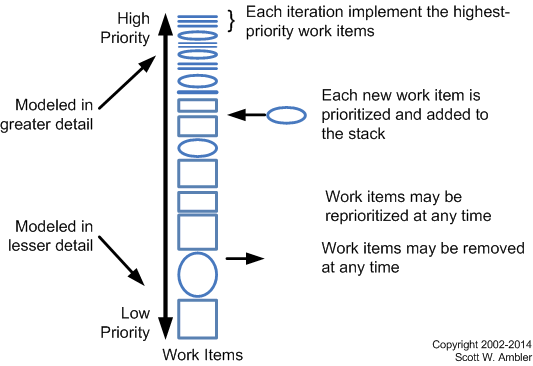
Because requirements change frequently you need a streamlined, flexible approach to requirements change management. Agilists want to develop software which is both high-quality and high-value, and the easiest way to develop high-value software is to implement the highest priority requirements first. Agilists strive to truly manage change, not to prevent it, enabling them to maximize stakeholder ROI. Your software development team has a stack of prioritized requirements which needs to be implemented – XPers will literally have a stack of user stories written on index cards. The team takes the highest priority requirements from the top of the stack which they believe they can implement within the current iteration. Scrum suggests that you freeze the requirements for the current iteration to provide a level of stability for the developers. If you do this then any change to a requirement you’re currently implementing should be treated as just another new requirement.
Figure5 overviews the agile approach to managing the work items potentially needed to be accomplished by the team (you may not actually have sufficient time or resources to accomplish all items). This strategy reflects the risk-value approach promoted by the Disciplined Agile (DA) tool kit. This approach to work management which is an extension to the Scrum methodology’s Product Backlog approach to requirements management. Where Scrum treats requirements like a prioritized stack, DAD takes it one step further to recognize that not only do you mplement requirements as part of your daily job but you also do non-requirement related work such as take training and review work products of other teams. New work items, including defects identified as part of your user testing activities, are prioritized by your stakeholders and added to the stack in the appropriate place. Your stakeholders have the right to define new requirements, change their minds about existing requirements, and even reprioritize requirements as they see fit. However, stakeholders must also be responsible for making decisions and providing information in a timely manner.
Figure 5. Agile requirements change management process.
Developers are responsible for estimating the effort required to implement the requirements which they will work on. Although you may fear that developers don’t have the requisite estimating skills, and this is often true at first, the fact is that it doesn’t take long for people to get pretty good at estimating when they know that they’re going to have to live up to those estimates. For more information, read Agile Change Requirements Management.