Organizing an Agile Modeling Room

Scott W. Ambler + Associates
 
   Home  |  AMDD  |  Best Practices  |  Architecture  |  Requirements  |  Analysis  |  Design  |  Documentation  |  Models  |  Modeling Style  |  Contact Us  |  Announcements  |  FAQ
Recently reviewed The environment in which you work has a significant impact on how effective you are as an agile modeler.  Remember the parable of that a horseshoe was lost for want of a nail, a horse was lost for want of a shoe, a knight was lost for want of a horse, an army was lost for lack of a knight, and a kingdom was lost for lack of an army?  Does it make sense that your organization be lost for lack of a whiteboard marker?  I hope not, yet I have literally been in organizations where people had to carry their own markers with them because if they left them behind in a meeting room they would soon be gone – for some reason this organization purposely maintained a chronic shortage of whiteboard markers, one of the most effective tools that people can use to enhance communication between them.  Aaarrrggghhh!!!  For agile modelers to be effective they need access to the right type of resources, and this implies that they need a working area that enables AM’s practices.  


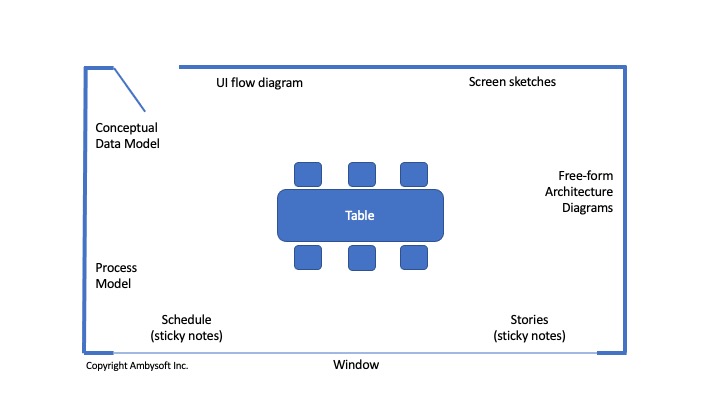
What does qualities are conducive to making agile modeling areas, likely a specific room or section within your department’s work area, effective?  In my experience the following factors, presented in priority order, are critical for creating an effective work area:

  1. You need dedicated space.  The most effective teams have their own working areas.  Yes, space is at a premium in many organizations but if senior management wants your team to succeed they have to provide you with the resources that you need.  You don’t want to have to wait to find a meeting room that’s available in order to get some modeling done.  You don’t want to have to worry about somebody erasing your whiteboards, or throwing your index cards in the garbage.  I’ve worked in several companies where there was a severe shortage of space, where we would have to wait for days to find meeting rooms.  Progress ground to a halt. 

  2. Significant whiteboard space.  As far as I’m concerned you can never have too much whiteboard space, and luckily whiteboards are incredibly inexpensive.  My preference is for having whiteboards floor to ceiling wherever empty wall exists, even on support pillars if they’re more than a foot (30 cm) or so in width.  Developers should have their own private whiteboard space so they can sketch diagrams on them, either alone, with their development pair (many projects teams, particularly XP teams, follow a pair programming approach), or with several co-workers.  Don’t have this whiteboard space? Talk to your facilities people, the folks responsible for the physical premises within your organization, and tell them that it’s a priority for your team.  Not allowed to have whiteboards?  Either have senior management pull some strings for you or simply install the whiteboards yourself and ask for forgiveness later.  Did you know you can purchase whiteboard wallpaper?  I’ve used it and it works.  If you can’t find whiteboard wallpaper you next option is to purchase 8’ by 4’ sheets of whiteboard.  Using either technology within a couple of hours you can easily cover a large room.

  3. Digital camera.  Digital cameras can be used to take snapshots of your modeling artifacts.  Common uses of digital cameras are to take pictures of critical diagrams to display them on internal web pages describing your project, capturing images of paper-based models such as essential UI prototypes or CRC models, capturing a snapshot of a diagram describing an alternative approach that you have chosen not to take for now but may want to revisit in the future, or simply to capture a permanent copy of a diagram so it may be placed under version control.  Digital cameras are inexpensive and easy to use.  I suggest purchasing a high-resolution camera, one that will capture the minute details, because the price difference isn’t that great.  Digital cameras often pay for themselves quickly because the alternative is for one of your highly-paid developers to transcribe the models that you want to capture onto paper.  Digital cameras are also a good substitute for the printing whiteboards that were popularized in the early 1990s – digital cameras are more flexible, far more portable, and less expensive.

  4. Modeling supplies.  The practice Use The Simplest Tools suggests that work with the simplest tool that will get the job done, therefore you need access to those tools.  You need ready access to whiteboard marker, Post-It Notes (have different colors and different sizes), index cards (you may also want different colors and sizes as well), writing paper, flip-charts, tape, stick pins, string, and whatever other modeling supplies that your team requires.

  5. A bookshelf or storage cabinet. You need somewhere to store your modeling supplies and reference books.

  6. Large table. Some techniques, such as Class Responsibility Collaborator (CRC) modeling, require a large table to work on.  Other times you need a table to place your notebooks on, or more importantly somewhere to put food when you get lunch delivered. 

  7. Computer.  Having a computer in your modeling area can often prove advantageous, particularly if you need to research information on the Internet during a modeling session (something I would rather have someone do offline after a modeling session) or simply to access previous models that have been placed under version control.  You may even want to have a CASE tool installed on this computer so you can capture your work in your chosen tools.  However, never forget that complicated tools introduce a barrier to communication and may actually be counterproductive for the team as a whole.  If you are going to have a computer in your working area then make sure you get a good one because you don’t want a group of people waiting on a machine.

  8. Chairs.  Although stand-up working sessions are incredibly productive – people focus on getting the work done and appear to be more willing to contribute – the reality is that people want to be able to sit down occasionally.  I believe in having a few chairs in a working area, it’s interesting to note that it’s called a working area and not a sitting area, so that if some people want to sit down then they can.  This is particularly important at the beginning of a project because your modeling sessions are likely to be longer, see Rethinking Modeling Sessions, and therefore there will be a greater desire to sit.  During the construction phase of your project modeling sessions have a tendency to be much shorter, often between ten and twenty minutes in length, therefore a stand-up session is much more palatable to the people involved.

  9. Wall space to attach paper.  It’s good to have some non-whiteboard wall space, that way you somewhere where you can attach paper artifacts.  If possible have cork board installed, or worst case simply have a few sections of plain wall space.

  10. Projector.  If you are going to have a computer in your working area you should also consider having a project to attach it to so you can display images on the wall.  This promotes communication because everyone can see the information.  However, a common mistake that teams make is to try to capture information in a CASE tool during a modeling session, the basic idea is that a “CASE jockey” will work the tool as everyone models, often projecting onto a whiteboard where others will draw over the image.  The problem with this approach is that it typically proves to be incredibly unproductive because everyone on the team ends up waiting for the CASE jockey to capture the information.  A better approach would be to use the more flexible tools, the whiteboards, to work together and then use the less flexible tool, the CASE tool, to capture the results later on.  To support the whiteboard modeling effort you may choose to have the CASE jockey display existing models, the difference would be that you don’t try to update the models as you move forward.

  11. Reference books.  When you are modeling you often find that you access to common reference information, such as the UML notation for a specific concept or the definition of a design pattern.  In Table 1 I provide a short list of books that I have find useful during modeling sessions.  In fact, I typically ask my clients to minimally order in at least one copy of each book for the team and suggest that developers have their own individual copies that they can mark up as they please.

  12. Food.  Having food available in your working area is often appreciated by all and will help to build camaraderie.  A selection is a good idea, not everyone has the same tastes or eating habits.  I personally gravitate towards hard candies, they’re small and store well, and fresh fruit.

  13. Toys.  Having something to play with in your hands can help you to get “unstuck” when you’re working.  Many teams will also enforce politeness rules by allowing people to throw a foam ball at someone else when they’re being rude or inconsiderate.


Table 1. Suggested modeling reference books.

Title

Usage

The Object Primer 3rd Edition: AMDD With UML 2

Reference book for a wide range of techniques, including the UML diagrams.

UML Distilled

Good reference manual for UML

Analysis Patterns: Reusable Object Models

Defines solutions to common problems found in business applications.

Design Patterns: Elements of Reusable Object-Oriented Software

Defines solutions to common OO design problems.

A Systems of Patterns: Pattern-Oriented Software Architecture 

Defines solutions to common OO architecture and design problems.


It is important to understand that you will very likely need to tailor these features to support other aspects of your chosen software development process.  For example on an XP project your working area must include workstations that pairs of developers will work at, whereas a RUP project team may decide that everyone will work in their own private cubicle or office.  Larger teams may want several working areas with a shared common space perhaps.  Different team, different approaches to organizing their work areas.

I cannot overstress the importance of having adequate resources – note the use of the word “adequate” instead of “extravagant”.  Remember to apply the principle maximize stakeholder ROI!


Recommended Resources

The Object Primer 3rd Edition: Agile Model Driven Development (AMDD) with UML 2 The Object Primer 3rd Edition: Agile Model Driven Development with UML 2 is an important reference book for agile modelers, describing how to develop 35 types of agile models including all 13 UML 2 diagrams.  Furthermore, this book describes the techniques of the Full Lifecycle Object Oriented Testing (FLOOT) methodology to give you the fundamental testing skills which you require to succeed at agile software development.  The book also shows how to move from your agile models to source code (Java examples are provided) as well as how to succeed at implementation techniques such as refactoring and test-driven development (TDD).  The Object Primer also includes a chapter overviewing the critical database development techniques (database refactoring, object/relational mapping, legacy analysis, and database access coding) from my award-winning Agile Database Techniques book.
Agile Modeling Agile Modeling: Effective Practices for Extreme Programming and the Unified Process is the seminal book describing how agile software developers approach modeling and documentation.  It describes principles and practices which you can tailor into your existing software process, such as XP, the Rational Unified Process (RUP), or the Agile Unified Process (AUP), to streamline your modeling and documentation efforts.  Modeling and documentation are important aspects of any software project, including agile projects, and this book describes in detail how to elicit requirements, architect, and then design your system in an agile manner.
Elements of UML 2.0 Style The Elements of UML 2.0 Style describes a collection of standards, conventions, and guidelines for creating effective UML diagrams. They are based on sound, proven software engineering principles that lead to diagrams that are easier to understand and work with.  These conventions exist as a collection of simple, concise guidelines that if applied consistently, represent an important first step in increasing your productivity as a modeler.  This book is oriented towards intermediate to advanced UML modelers, although there are numerous examples throughout the book it would not be a good way to learn the UML (instead, consider The Object Primer).  The book is a brief 188 pages long and is conveniently pocket-sized so it's easy to carry around.


Let Us Help

We actively work with clients around the world to improve their information technology (IT) practices, typically in the role of mentor/coach, team lead, or trainer.  A full description of what we do, and how to contact us, can be found at Scott W. Ambler + Associates.


Disciplined Agile Delivery: The Foundation for Scaling Agile Agile Modeling: Practices for Scaling Agile Agile Data: Practices for Scaling Agile EnterpriseUP: Agility at Scale AgileUP: Towards Disciplined Agile DeliveryAmbysoft Inc. Software Development Practices Advisor Scott Ambler + Associates Follow @scottwambler on Twitter!


Copyright © 2001-2012 Scott W. Ambler

This site owned by Ambysoft Inc.