
User Stories: An Agile Introduction
- Introduction to user stories
- Initial user stories (informal)
- Initial user stories (formal)
- User stories and planning
- User stories throughout the agile lifecycle
- Detailing a user story
- Epics
- Themes
- Specializations of user stories
1. Introduction to User Stories
A good way to think about a user story is that it is a reminder to have a conversation with your customer (in XP, stakeholders are called customers), which is another way to say it’s a reminder to do some just-in-time analysis. In short, user stories are very slim and high-level requirements artifacts.
2. Initial User Stories (Informal)
As you can see in Figure 1 user stories are small, much smaller than other usage requirement artifacts such as use cases or usage scenarios. It’s important to recognize that each of the statements in Figure 1 represents a single user story.
Figure 1. Example user stories.
|
Important considerations for writing user stories:
- Stakeholders write user stories.An important concept is that your stakeholders write the user stories, not the developers. User stories are simple enough that people can learn to write them in a few minutes, so it makes sense that the domain experts (the stakeholders) write them.
- Use the simplest tool. User stories are often written on index cards as you see in Figure 2 (at least when your team is co-located). Index cards are very easy to work with and are therefore an inclusive modeling technique.
- Remember non-functional requirements. Stories can be used to describe a wide variety of requirements types. For example in Figure 1 the Students can purchase parking passes online user story is a usage requirement similar to a use case whereas the Transcripts will be available online via a standard browser is closer to a technical requirement.
- Indicate the estimated size. You can see in Figure 2 that it includes an estimate for the effort to implement the user story. One way to estimate is to assign user story points to each card, a relative indication of how long it will take a pair of programmers to implement the story. The team then knows that if it currently takes them on average 2.5 hours per point; therefore the user story in Figure 2 will take around 10 hours to implement.
- Indicate the priority. Requirements, including defects identified as part of your independent parallel testing activities or by your operations and support efforts, are prioritized by your stakeholders (or representatives thereof such as product owners) and added to the stack in the appropriate place. You can easily maintain a stack of prioritized requirements by moving the cards around in the stack as appropriate. You can see that the user story card includes an indication of the priority; I often use a scale of one to ten with one being the highest priority. Other prioritization approaches are possible – priorities of High/Medium/Low are often used instead of numbers and some people will even assign each card it’s own unique priority order number (e.g. 344, 345, “¦). You want to indicate the priority somehow in case you drop the deck of cards, or if you’re using more sophisticated electronic tooling. Pick a strategy that works well for your team. You also see that the priority changed at some point in the past, this is a normal thing, motivating the team to move the card to another point in the stack. The implication is that your prioritization strategy needs to support this sort of activity. My advice is to keep it simple.
- Optionally include a unique identifier. The card also includes a unique identifier for the user story, in this case 173. The only reason to do this would be to do this is if you need to maintain some sort of traceability between the user story and other artifacts, in particular acceptance tests.
Figure 2. User story card (informal, high level).

2. Initial User Stories (Formal)
In User Stories Applied Mike Cohn suggests a more formal approach to writing user stories. He suggests the format:
As a (role) I want (something) so that (benefit).
For example, the user story of Figure 2 could be rewritten as “As a Student I want to purchase a parking pass so that I can drive to school”, as you see in Figure 3. My experience is that this approach helps you to think about who a certain feature is built for and why, and as a result is the approach that I typically prefer to take. The best advice that I can give is to try both and see which approach works best for you.
Figure 3. User story card (formal, high level).

4. User Stories and Planning
There are two areas where user stories affect the planning process on agile initiatives:
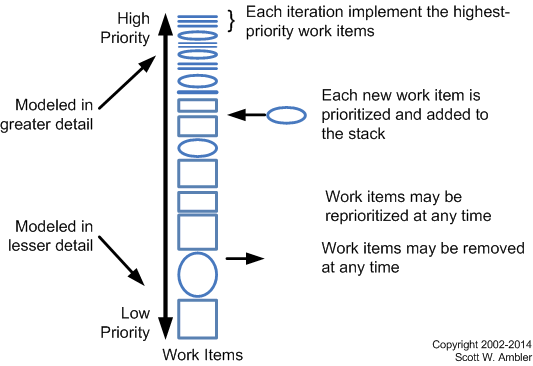
- Scheduling. Figure 4 depicts the agile change management management process where work items, including stories, are addressed in priority order. So, the implication is that the priority assigned to a story affects when the work will be done to implement that requirement. As discussed earlier, stakeholders are responsible for prioritizing requirements. Note that in Figure 2 a numerical prioritization strategy was taken (perhaps on a scale of 1 to 20) whereas in Figure 3 a MoSCoW (Must Should Could Won’t) approach was used. Stakeholders also have the right to define new requirements, change their minds about existing requirements, and even reprioritize requirements as they see fit. However, stakeholders must also be responsible for making decisions and providing information in a timely manner.
- Estimating. Developers are responsible for estimating the effort required to implement the things which they will work on, including stories. The implication is that because you can only do so much work in an iteration, the size of the work items (including stories), affect when those work items will be addressed. Although you may fear that developers don’t have the requisite estimating skills, and this is often true at first, the fact is that it doesn’t take long for people to get pretty good at estimating when they know that they’re going to have to live up to those estimates. If you’ve adopted the pair programming practice then a user story must be able to be implemented by two people in a single iteration/sprint. Therefore if you’re working in one week iterations each user story must describe less than one week worth of work. Of course, if you aren’t taking a non-solo development approach such as pair programming the user story would need to be implementable by a single person within a single iteration. Large stories, sometimes called epics, would need to be broken up into smaller stories to meet this criteria.
Figure 4. Disciplined agile change management process.
5. User Stories Throughout the Agile Lifecycle
Figure 5 depicts the AMDD lifecycle, which calls out modeling activities during the delivery lifecycle. There are three common times when stories will be worked on during an agile initiative:
- Inception. You often create a stack of user stories during Sprint 0 as part of your requirements envisioning activities to identify the scope of your system.
- Construction. During construction iterations you will identify new stories, split existing stories when you realize that they’re too large to be implemented in single iteration, reprioritize existing stories, or remove stories that are no longer considered to be in scope. The point is that your stories evolve over time just like other types of requirements models evolve. Furthermore, enhancement requests may be identified by your support staff during the production phase and then forwarded to a development team as they are working on an upcoming release. These enhancement requests are effectively new stories (albeit in a different format).
- Transition. Sometimes new stories will be identified during the Deploy phase, although this isn’t very common as the focus of release is on hardening the system and not on new functionality. But it does happen, and these stories would be prioritized and placed on the stack in priority order just as you normally would.
Figure 5. The AMDD lifecycle: Modeling activities throughout the lifecycle of an initiative (click to enlarge).

6. Detailing a User Story
Because user stories contain so little information you will need to flesh them out a bit when you first work with them. There are three common times when you would do this:
- During JIT analysis/model storming with stakeholders. Remember the early definition of “user stories are a reminder to have a conversation with your stakeholders”? Well, during that conversation you’re going to explore the details behind that user story. It is quite common the create screen sketches with stakeholders to explore what they want. It is also common to identify the acceptance criteria, or confirmations, which the stakeholders will use to validate that the user story has been implemented correctly. Figure 6 shows how the back side of a user story card can be used to capture the confirmations. Of course, other tools which are more sophisticated than index cards can be used for this purpose as well.
- During iteration planning. As part of the estimation effort it is quite common to list programming tasks required to implement the user story.
- During implementation. When you start to work on implementing the user story you may decide to create some rough sketches of what you’re going to build, perhaps a flow chart or UML activity diagram representing the relevant business logic.
Figure 6. User story card (formal, with confirmations).

7. Epics
Epics are large user stories, typically ones which are too big to implement in a single iteration, and therefore they need to be disaggregated into smaller user stories at some point.
Epics are typically lower-priority user stories because once the epic works its way towards the top of the work item stack (see Figure 4) it is reorganized into smaller ones. It doesn’t make sense to disaggregate a low-priority epic because you’d be investing time on something which you may never get to addressing, unless a portion of the epic is high-priority and needs to be teased out. Remember to defer commitment, in this case, model on a just-in-time (JIT) basis, to increase your overall productivity.
8. Themes
A theme is a collection of related user stories. For example, for a university registration system there might be themes around students, course management, transcript generation, grade administration, and financial processing.
Themes are often used to organize stories into releases or to organize them so that various subteams can work on them.
9. Specializations
- AI Stories. For teams building artificial intelligence (AI) based systems.
- Question Stories. For teams building data products, including data warehouse/BI solutions.